Monitoring your mutual fund portfolio on your phone is one of the simplest financial habits you can build — and one of the most consistently overlooked by investors who set up SIPs and then check in only at tax time or when markets make news. Regular portfolio review doesn’t mean reacting to every market movement. It means maintaining awareness of your investment’s health, identifying underperforming funds before problems compound, and making informed decisions about rebalancing when your life circumstances change.
The good news is that in 2026, checking your mutual fund portfolio daily — with complete, accurate, real-time data — requires nothing more than your smartphone and one of several free platforms that aggregate your holdings automatically.
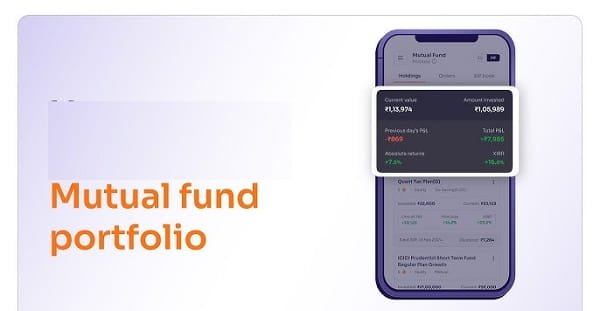
The Best Mobile Platforms for Daily Portfolio Tracking
MF Central App: The most authoritative source for mutual fund portfolio data is MF Central — jointly operated by CAMS and KFintech, India’s two registrar and transfer agents. Download the MF Central app from the Play Store or App Store. Register using your PAN and Aadhaar-linked mobile number. After OTP verification, the app automatically aggregates all your mutual fund folios across every fund house — direct plans, regular plans, statement-of-account holdings, and Demat-held units — into a single consolidated view.
The daily portfolio value is displayed using the previous business day’s closing NAV — NAVs are not real-time intraday figures but are published once per day after market close. Your portfolio’s current value, overall gain or loss, and individual scheme performance are visible without any manual data entry.
Broker Apps for Demat-Held Units: If your mutual fund units are held in Demat form through a broker — Zerodha Coin, Groww, HDFC Sky, Paytm Money, ET Money, or similar — the broker’s app shows your mutual fund holdings alongside your equity portfolio. Navigate to the mutual fund or portfolio section to see your scheme-wise holdings, current NAV, invested value, and unrealised gain or loss in percentage and absolute terms.
CAMS and KFintech Apps: For investors who prefer registrar-direct access, the CAMS myCAMS app and KFintech’s MF Investor app provide scheme-by-scheme views of your holdings — but only for funds within that registrar’s network. For a complete picture, MF Central is superior since it covers both registrar networks simultaneously.
Understanding the Numbers on Your Screen
The portfolio value displayed on any of these apps reflects yesterday’s closing NAV multiplied by your current unit balance. The figure updates once each business day — typically by 11 PM on the same day for most equity funds, slightly later for debt and liquid funds — after the AMC publishes the NAV to AMFI.
The gain or loss percentage visible in your app is typically the point-to-point return from your investment date to the current date. For SIP portfolios — where units are purchased at multiple NAVs over time — the meaningful return metric is XIRR, which accounts for the timing of each cash flow. Several broker apps now display XIRR automatically. If your app displays only absolute gain or loss percentage without XIRR, supplement this by calculating XIRR manually using Excel or one of several free XIRR calculator tools available online.
Setting Up Portfolio Alerts Without Overmonitoring
The risk of daily portfolio checking is emotional decision-making — seeing a 3% portfolio drop on a volatile day and being tempted to stop SIPs or redeem units. A practical safeguard is using the notification settings in your broker or MF Central app to set threshold-based alerts rather than checking raw numbers daily.
Set a notification for portfolio drawdowns below a defined percentage — say 15% from peak — and for individual fund performance falling below benchmark over a rolling three-month period. These alert conditions filter out day-to-day noise and bring your attention to situations that genuinely warrant review, without exposing you to the anxiety of real-time market fluctuations throughout the trading day.
Frequently Asked Questions (FAQs)
Q1. My portfolio shows different values on my broker app versus MF Central. Which is correct?
A: Minor differences arise from timing — different apps update NAVs at slightly different intervals throughout the evening after market close. If the difference persists beyond one business day, check whether both platforms are reflecting the same number of units. Broker apps sometimes display only Demat-held units while MF Central shows all folios including statement-of-account holdings. Both numbers may be individually correct but covering different subsets of your total portfolio.
Q2. Can I track mutual funds from different family members on the same mobile app?
A: MF Central and broker apps are PAN-linked — each login displays the portfolio of the PAN holder. To view a family member’s portfolio, they must either log in separately or grant portfolio viewing access through the specific sharing mechanisms some apps provide. There is no universal multi-PAN family portfolio view in a single login across all platforms currently, though some third-party aggregator apps allow multiple PAN linking within a single account interface.
Q3. Does checking my portfolio daily have any negative financial consequence — fees, charges, or tax triggers?
A: No. Viewing your portfolio on any platform — MF Central, broker app, or registrar portal — is a read-only activity that has no financial consequence whatsoever. No charges, no tax implications, and no impact on your investment. Redemption or switching would trigger tax events, but passive portfolio viewing does not.
Q4. My app shows an unrealised loss on one fund. Should I exit immediately?
A: An unrealised loss is a paper figure — it becomes real only when you redeem. Before deciding to exit, assess whether the fund is underperforming its benchmark consistently over three to five years, or whether the current loss reflects broad market conditions affecting all funds in the category. Exiting during broad market downturns locks in losses and removes you from the recovery. Category-specific or manager-specific underperformance sustained over multiple years is a more meaningful reason to consider switching.
Q5. Can I track direct plan mutual funds and regular plan mutual funds separately on my phone?
A: Yes. Both MF Central and broker apps display the plan type — Direct or Regular — alongside each scheme’s details in your portfolio view. Your gain and current value for each plan is displayed separately. This is particularly useful for investors who have both plan types and want to compare the performance differential to evaluate whether consolidating into Direct plans would meaningfully improve net returns.